
You’ve spent weeks perfecting your website. The design is clean, the content is sharp, and the product is great. But visitors keep bouncing before they ever see any of it. The culprit? A slow-loading page.
Page speed isn’t just a technical nicety — it’s one of the most impactful factors affecting your user experience, search rankings, and bottom line. Here’s what you need to know, and what you can do about it.
Why Page Speed Actually Matters
Let’s start with the numbers. Studies consistently show that users expect a page to load in under two seconds, and more than half will abandon a site that takes longer than three. That’s not impatience — that’s a learned expectation shaped by years of fast experiences elsewhere on the web.
Beyond user behavior, Google officially uses page speed as a ranking signal through its Core Web Vitals metrics. Slow sites get penalized in search results, meaning you’re losing organic traffic before a single visitor even has the chance to bounce.
For e-commerce, the stakes are even higher. A one-second delay in load time can lead to a measurable drop in conversions. Milliseconds genuinely translate into money.
What's Slowing Your Site Down?
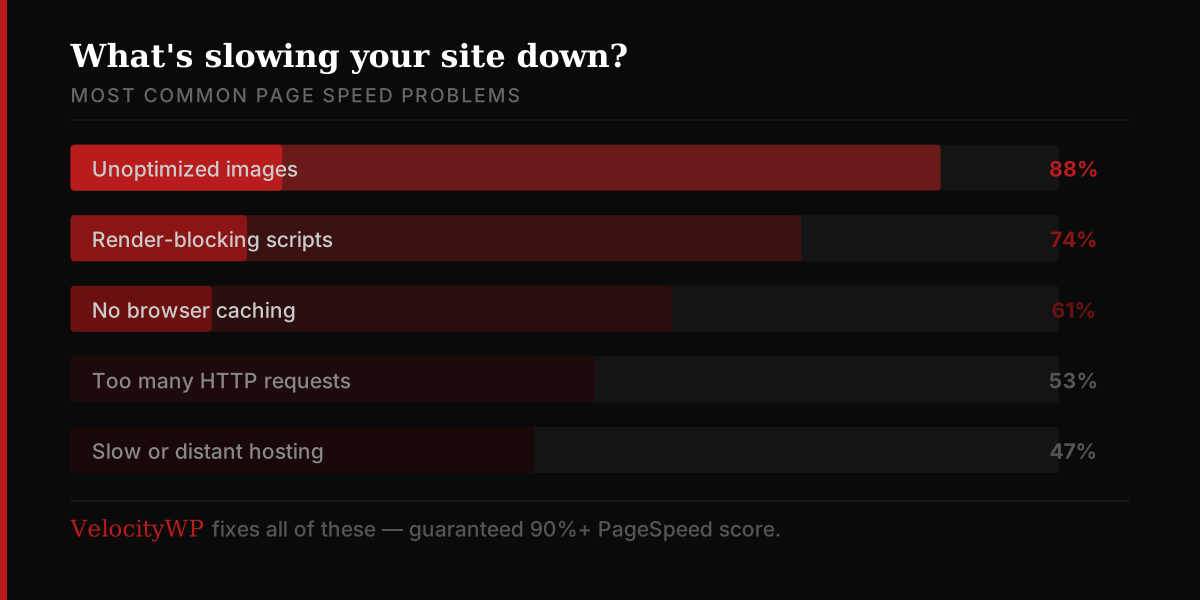
Before you can fix anything, you need to know where the drag is coming from. The most common culprits include unoptimized images, which are the single biggest cause of slow load times for most websites. Too many HTTP requests also add up quickly — every script, stylesheet, font, and image is a separate round trip to the server. Render-blocking resources like JavaScript and CSS files can delay the page from displaying anything at all. Without proper caching, browsers have to re-download the same assets on every visit. And even perfectly optimized code can crawl on underpowered or geographically distant hosting.
How to Speed Things Up
The good news is that most page speed issues are fixable without a complete rebuild. Here’s where to start.
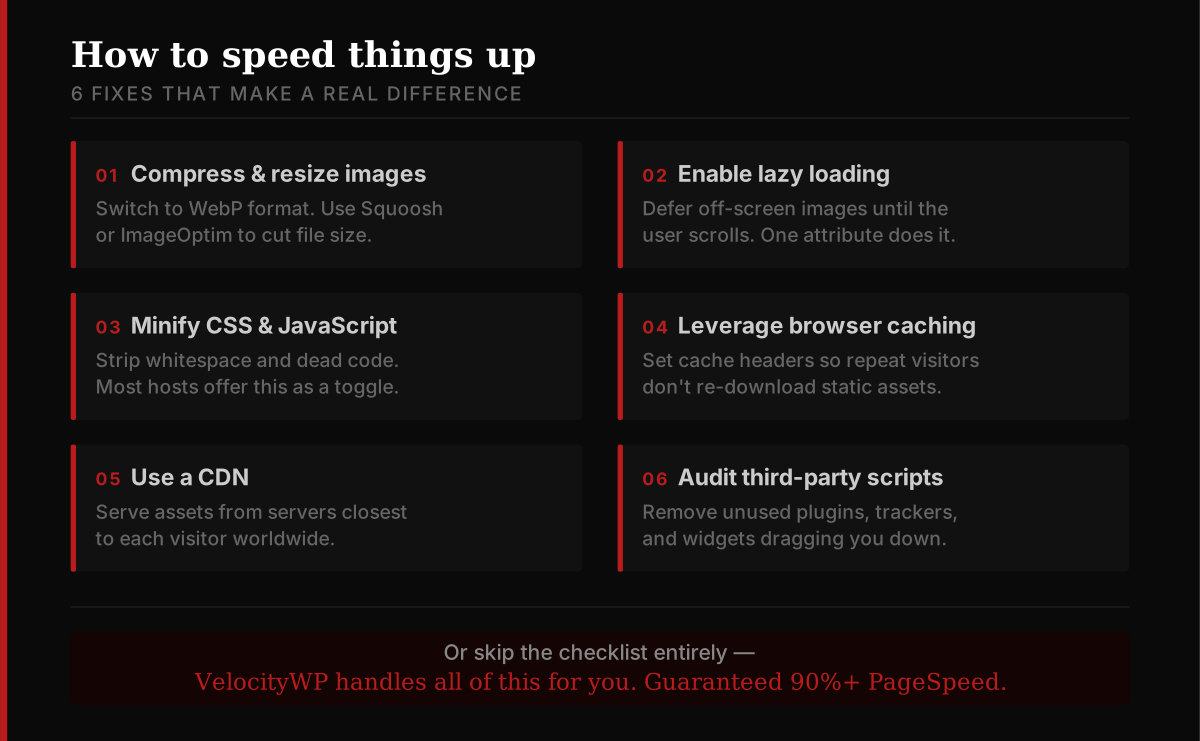
Compress and resize your images. Switch to modern formats like WebP, which offers better compression than JPEG or PNG with no visible quality loss. Tools like Squoosh or ImageOptim can handle this automatically.
Enable lazy loading. Instead of loading every image on a page at once, lazy loading defers off-screen images until the user scrolls toward them. This dramatically reduces initial load time.
Minify your CSS and JavaScript. Minification strips out whitespace and unnecessary characters from your code files. Most modern build tools do this automatically, and many hosting platforms offer it as a simple toggle.
Leverage browser caching. Set appropriate cache headers so returning visitors don’t have to re-download static assets. Files like logos, fonts, and stylesheets rarely change — there’s no reason to serve them fresh every time.
Use a Content Delivery Network (CDN). A CDN distributes your assets across servers around the world, serving files from a location close to each visitor. This alone can cut load times significantly for international audiences.
Audit third-party scripts. Analytics tools, chat widgets, ad trackers, and social embeds all add weight to your page. Regularly audit what’s running, remove anything you don’t actively use, and load the rest asynchronously where possible.
Let VelocityWP Handle It All For You
Optimizing page speed takes time, technical knowledge, and ongoing attention. That’s exactly why VelocityWP exists.
We specialize in WordPress performance optimization and take care of everything — image compression, caching configuration, CDN setup, code minification, server tuning, and more. We don’t just make your site faster; we guarantee a 90% or higher Google PageSpeed score.
Whether you’re running a blog, a business site, or an online store, a faster website means better rankings, happier visitors, and more conversions. You focus on running your business — we’ll make sure your website is never the thing slowing you down.
Ready to hit 90? Get in touch with VelocityWP today.
How to Measure Your Progress
Even after optimization, it’s worth knowing how to track your results.
Start with these free tools:
Google PageSpeed Insights analyzes your URL and gives specific, actionable recommendations scored against Core Web Vitals.
GTmetrix offers waterfall charts that show exactly which assets are causing delays. WebPageTest lets you test from different locations and devices for a realistic picture of real-world performance.
Aim for a Largest Contentful Paint (LCP) under 2.5 seconds, a Cumulative Layout Shift (CLS) score under 0.1, and an Interaction to Next Paint (INP) under 200 milliseconds. Those are Google’s thresholds for a “good” score.
The Bottom Line
Page speed optimization isn’t a one-time fix — it’s an ongoing discipline. As your site grows and changes, new bottlenecks will appear. But the fundamentals stay the same: keep your assets lean, reduce unnecessary requests, and get content in front of users as fast as possible.
A faster site isn’t just better for SEO or conversions. It’s simply a better experience — and that’s something both your visitors and your metrics will thank you for.
Want the guaranteed shortcut?
VelocityWP delivers a 90%+ PageSpeed score so you don’t have to figure it out alone.
